

Reorder and low-stock alerts
Reorder before stock runs out. Each product's reorder point follows real usage and supplier delivery time, while suggested quantities account for goods already on order.
Free plan with 2 users, 100 products and 1 location. No credit card, no time limit.

Why it matters
Anticipate stockouts
Reorder dates follow real usage and each product's delivery time.
Factor in incoming stock
Suggested quantities account for approved orders and stock already on its way.
Know what needs action
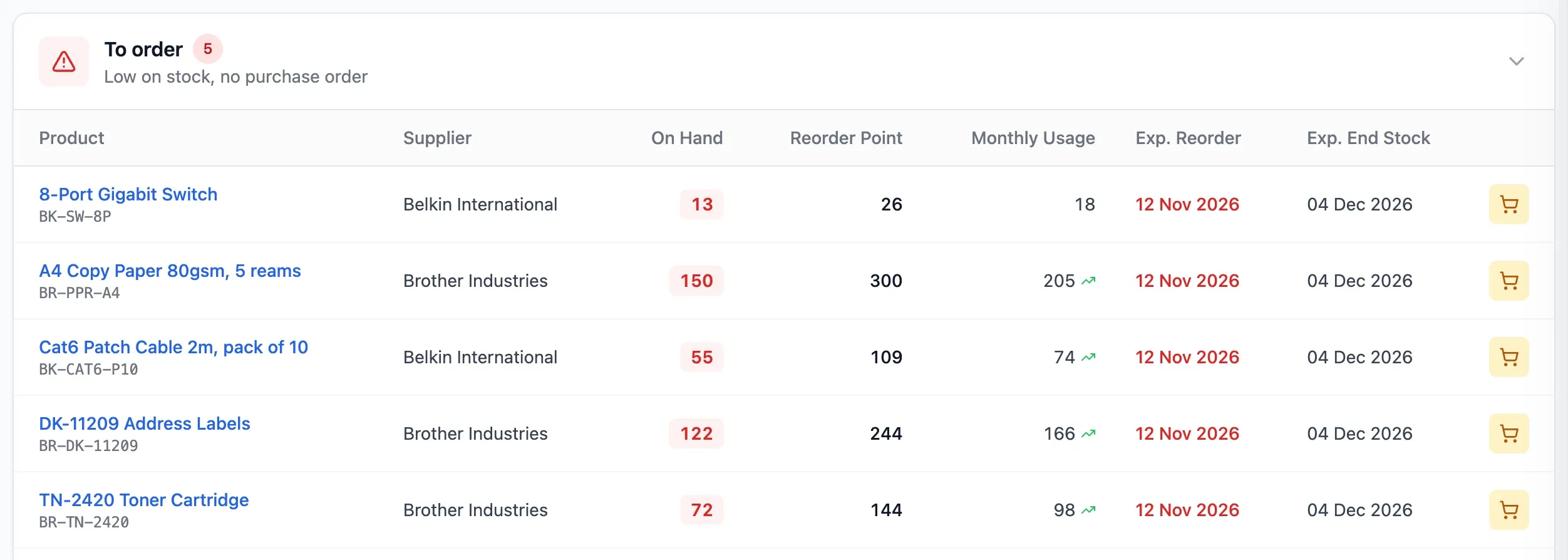
Alerts separate products already on order from those still to order.
How it works
StockBold tells you what to reorder and how much. You make the decision, and every order still goes through approval.

Step 1 of 4
Set delivery times
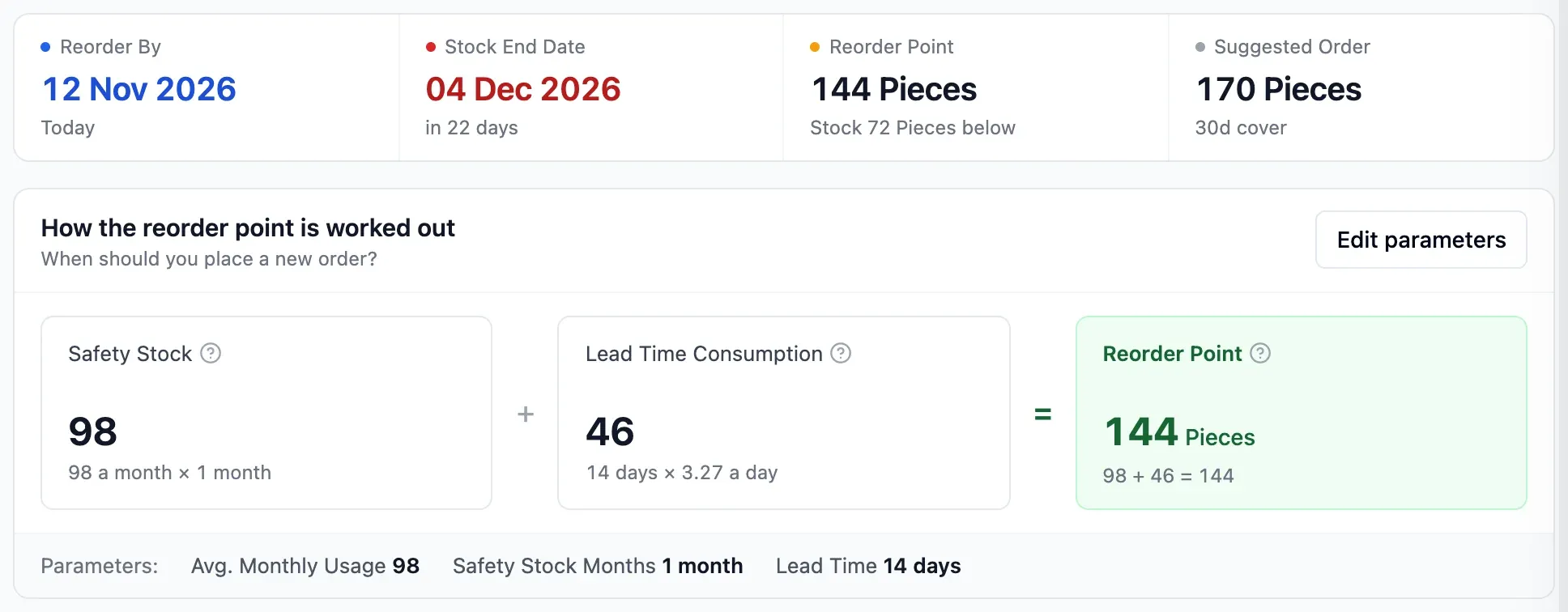
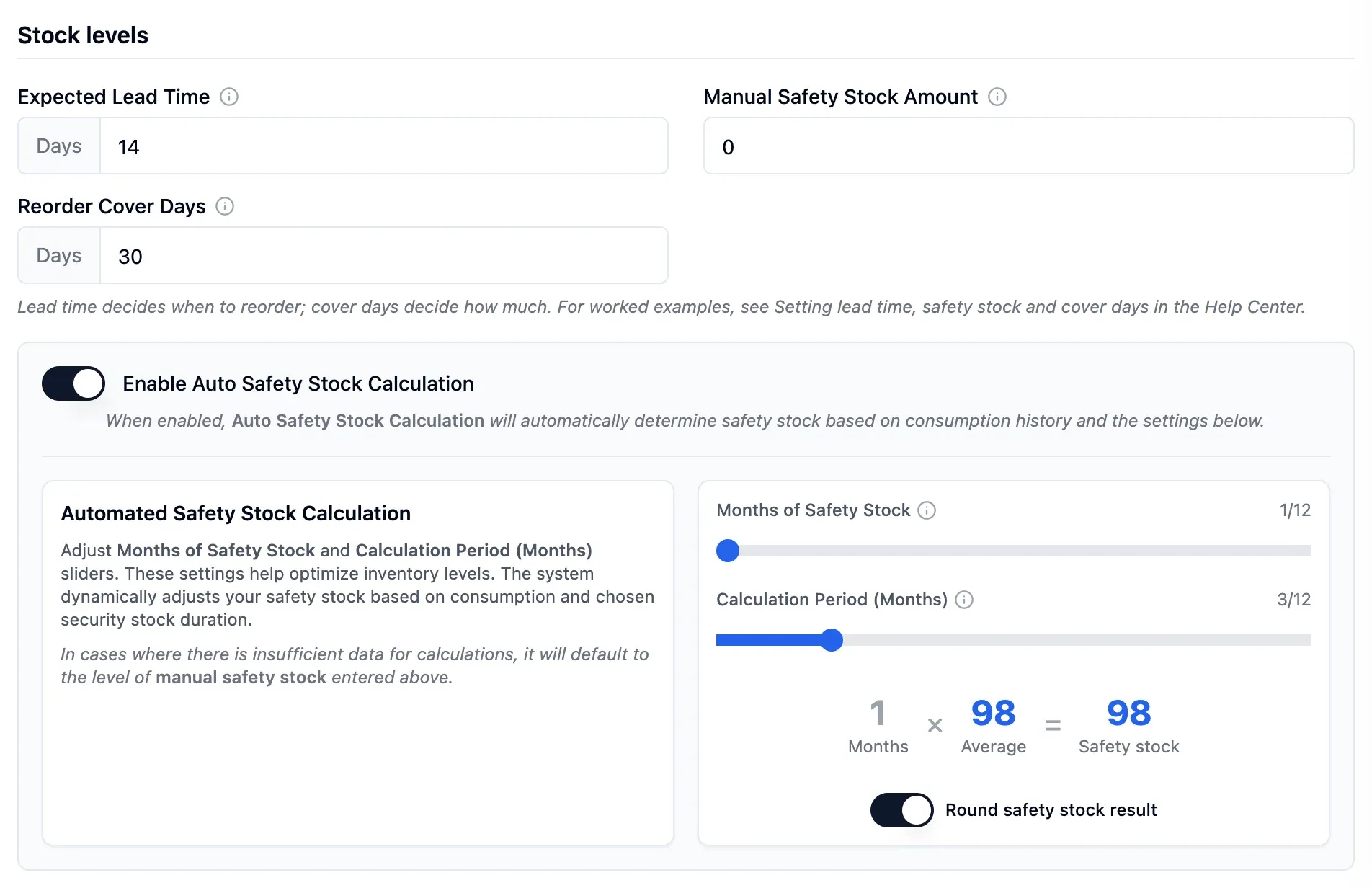
Enter each product's delivery time and the safety stock you want to hold. You can also calculate safety stock from usage.
- Delivery time feeds each reorder point
- Manual and usage-based safety stock can combine
- The higher safety stock figure applies
Step 2 of 4
Set cover days
Set cover days to decide how many days of usage a suggested order should cover. At 30 days, the suggested quantity covers about a month of usage.
- Higher cover days increase suggested quantities
- Quantities net of goods already on order
- Transfers do not count as usage

Step 3 of 4
Review reorder alerts
See every product whose available stock is at or below its reorder point, or its manual safety stock when automatic calculation is off. Products whose reorder date has arrived also appear, separated into those to order and those already on order.
- Daily email when enabled in your settings
- Units held for supplier claims do not count as available
- Muting only changes your own alerts
Step 4 of 4
Create a purchase order
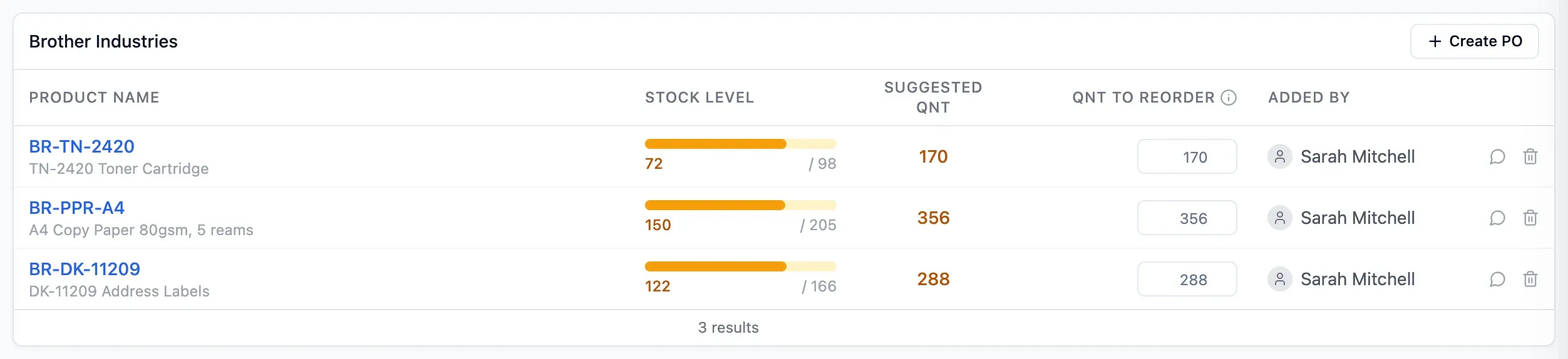
Group suggestions by supplier in a personal or team reorder list. Create PO opens a purchase order for that supplier with the products and suggested quantities filled in.
- Team lists support comments and mentions
- Purchase orders still need approval
- Ordered items stay in list history
In detail
Flexible safety stock
Set it by hand, calculate it from usage, or use both. With both, the higher figure applies.
30-day run-out forecast
See the products expected to run out within 30 days, by urgency, with the days left.
Only real usage counts
Stock out movements, components used in assemblies and stock-reducing adjustments count. Transfers and returns of faulty goods to suppliers do not.
Transparent calculations
Each product shows the usage, safety stock and lead time behind its reorder point.
Personal and team lists
Personal lists are visible only to you. On the team list, colleagues comment on items and mention each other.
A list that stays current
Ordered items leave the list and stay in the history with their purchase order number.
New products covered
With a manual safety stock, the list suggests how much to order, even for new products.
- Start free
Try it free
Free plan with 2 users, 100 products and 1 location. No credit card, no time limit.
Common questions
Another question?
Write to us from the contact page, or search the guides.
Does StockBold create orders automatically?
No. StockBold suggests what to buy and how much, but you create the purchase order and it goes through approval.
Which products get reorder dates and alerts?
Reorder dates need automatic calculation based on real usage. Alerts cover every product whose available stock is at or below its reorder point, or its manual safety stock when automatic calculation is off. They also cover products whose reorder date has arrived.
Who receives the low-stock email?
Users who have the daily low-stock notification on in their settings receive it for products they can see. Products they have muted are left out of their own notification.
How does it work for a new product with no history?
Without usage there is no reorder date. Set a manual safety stock and the reorder list suggests the quantity to reach it.
What if my supplier has a minimum order?
Raise cover days to increase the suggested quantity, then check it against the supplier's minimum. At 10 units a day, 50 days covers 500 units of usage.
Try it free
No credit card or time limit. Upgrade when you need more capacity.